PACKING FOR ASSIGNMENT

Porta-Brace video camera case and Think Tank Photo roller bag. 


Planning, research and organization are essential. The first thing I do when given an assignment is start asking questions like, when, where, still, video, deadline.

Next comes the logistics, such as will I fly or drive, be staying at a hotel or aboard a ship at sea, need a rental car or will I use my personal vehicle?

Answers to these questions greatly impact what gear I need and how and what I will pack.

Next begins the research phase of the trip. I start with the writer if one has been assigned and see what research has already been done. Sometimes a draft of the story has already been started. Next I'll contact the program manager or subject matter expert, introducing myself and requesting any and all background information they can provide. I also ask them what I can expect to see and if there are any restrictions when I'm on location. Never want to find out for the first time that cameras aren't allowed or something is classified when I arrive.


Finally I print out my Gear Pack List. I'm big on lists and the only way to ensure that you have everything you need when you arrive is to make sure you pack it. I downloaded this list several years ago from another photographer and over the years I've personalized it to include all the gear I own and everything else that I can think of. I just use a sharpie to cross out what I will not need for a particular trip and then use a red pen to check off items as they are packed. Hopefully you have the time to really contemplate what you are going to need, but even if time is tight, the list will ensure you are prepared. Many times it's a give and take, for instance, if I'm driving to location, it is easier to load more gear than I might need, however if I'm flying, then taking a small boat to meet a larger ship at sea, packing light and tight becomes more critical.
Pelican 1610 case with 1615 padded divider.

Most of my jobs require both video and still photography in some capacity, however, during initial conversation I have to determine which is primary. Is this part of a full video production with interviews and lighting requirements, or are they only interested in B-Roll and maybe a short clip for YouTube? For the latter I might be able to get away with just the D3S to shoot both still and video.

All my gear gets packed in either an Airport International Rolling Camera Bag from Think Tank Photo, a Pelican 1610 case with a 1615 padded divider set or a Porta Brace video camera bag. Other less breakable items such as a tripod, light stands, cords, light modifiers, chargers, etc., get packed into a soft duffel or regular luggage with clothes. And don't forget plenty of bubble wrap. I've checked all of these bags on different occasions, with the exception of the Porta Brace, and never had a problem. Although the Pelican hard case almost always pushes the weight limit.

One last bit of advice. If possible arrive the day before the job starts to allow for lost or delayed luggage. It also gives you time to break out and check gear, get batteries on charge, etc. But just in case, I always travel with a laptop, compact flash card reader, one camera body and lens with flash in my carry on so I can at least  capture something if all else fails.

For advice from photographers who have traveled tens and hundreds of thousands of miles each year, Think Tank Photo has posted two free articles, "Fear for Your Gear - Part I," and "Fear for Your Gear - Part II" INTERNATIONAL TRAVEL. You need to provide your name and email address to gain access to the PDFs, but it is well worth it.

PRINTS ON THE WALL

Photo taken with a Lego camera and processed in LR4.

As I looked around my apartment recently I realized that the four photos framed and hanging on my walls that were shot by me had been there since I moved in almost seven years ago.

I had heard of

Mpix

as a member of the

National Association of Photoshop Professionals

and decided it was time give it a try. I had two photos from my trip to Kodiak that I thought would be a good test.

The first order I placed was for a 11 x 14 inch E-Surface print surrounded by a two inch white mat with a black flat frame and covered with glass. It is a simple online process to upload your photo and make various mat and frame selections. You can also preview what the final product will look like matted and framed before you purchase.

Mpix

will also color correct for you if desired, however, so far I've not taken them up on that and the results have been spot on.

If you order by 11 a.m. you will have the framed photo in two business days.

I followed this up with two more orders, a 12 x 18 inch E-Surface print surrounded by a two inch white mat with a black metal frame and then most recently I had a 20 x 30 inch black and white print delivered. That is a 20x30 inch print with a two inch mat and I went back to the black flat frame which adds four inches to each dimension. Still arrived in two days and took longer to unpack than it did to place the order.

Two things that I wish would change. First, you are limited to the 2 inch mat which means you can't mat an 8x10 inch photo in a 16 x 20 inch frame. Creating a mat effect in Photoshop would be one possible workaround. Second, I recently received an email from

Mpix

letting me know that they will remove my photos from their server unless I order another print soon. While I understand they are not a storage site, I'm not sure how the three photos I have sitting in my account are busting their data capacity.

Mpix

does all kinds of other printing, including canvas. I spoke with them at PhotoPlus Expo in New York where they had all kinds of samples and answered all my questions. I'm sure they will be exhibiting at

Photoshop World

in Washington, D.C., March 24-26, if you want to check them out first hand.

I've become a fan of this service and will definitely use them again.

BEST NON-PHOTO ACCESSORY

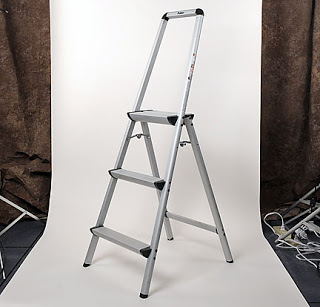
Using a Polder Ultra Light Aluminum 3-Step ladder allows you to see above the crowd.

Well I don't know if it is the best non-photo accessory I own, but I can tell you that since I purchased the Polder Ultra light Aluminum 3-Step Ladder in 2006, I have not regretted it.

This ladder is sturdy, only weighs a few pounds, and is easy to carry over a shoulder. And because of the extended top, gives you something to lean against so that you can concentrate on shooting and not balancing.

This piece of equipment seems to come in handy several times a month. The little bit of elevation it provides is nice when taking group shots and if I'm covering a conference, it allows me to see over the crowd from the back of the room or puts me at eye level with a speaker who is on a podium. I have even carried this with me on the Metro when covering events in the Washington D.C. area.

It also comes in handy for its intended use as well since none of the offices in the building I work at allow you to turn off the lights, I have remove the fluorescent light bulbs in order to control the lighting when conducting video interviews.

I have to credit a friend, photographer Johnny Bivera, who I first saw using this ladder when he was the Secretary of the Navy's personal photographer.

For around $60, it's a bargain and will provide you with more than just a height advantage. I noticed a slight difference between the ladder available for sale today and the one I'm using, but I know you won't be disappointed.

CAPTIONS PLEASE?

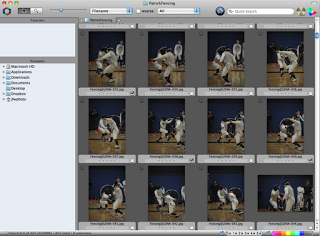
Screen grab from the program Photo Mechanic.
Screen grab from Photo Mechanic.
Something that continues to amaze me is the complete lack of caption information I receive when requesting photography. I'm not talking about photos from a scientist in the field or program manager documenting their technology, rather I am talking about photographs from professional photographers. I'm also somewhat surprised to learn that many photographers don't see this as part of the process when they are hired for an assignment.

Time after time, I have to follow up after the fact just to get some basic information about what I'm seeing in order use the image. No information, no names, no sense of what is going on, means no publication. While adding the who, what, where and when is a basic tenet in the photojournalism community where it is recognized that without proper caption data a photo just can't be used, the rest of the photography world seems to ignore this, or worse, see it as a major inconvenience.

My suggestion to all photographers is to spend $150 on the software program Photo Mechanic. Not only will Photo Mechanic save you time when editing large numbers of photos, it will also allow you to quickly rename, add caption metadata, including copyright information and then copy images to multiple locations. And you can do all of that when you ingest the images from your camera cards. A few minutes spent refining your workflow and you'll wonder how you ever managed.
Set your photography apart and increase your marketability by making sure you gather caption information. Added bonus is that when embedding caption information you are also embedding information about yourself, including photo credit, and if applicable, copyright information.

If you are serious about photography, download a trial version of Photo Mechanic for free, I dare you not to purchase.

UPDATE 2/10/12: Two websites, photometadata.org and iptc.org tell you everything you want to know and more about what I've described above.

TWO PHOTOGRAPHY MYTHS BUSTED

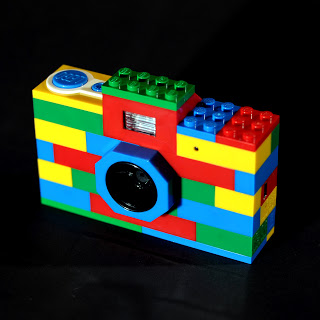
Lego Camera.
I've been reflecting on two things I used to hold as absolute, "never work for free" and "it's not the camera." Pretty standard advice or thoughts you hear all the time from photographers. Well maybe it's the new year, but I've challenged myself to think differently in 2012 and what better way then to bust a few myths.

Never Work for Free: I was adamant about this. It was the number one thing I would tell students or enthusiasts who were ready to take it to the next level when they'd ask my advice on the subject. I've changed my mind and even have considered working for free on a few projects this year myself as I expand my photography portfolio. I don't know if it was the word "never" or the word "free'" that I was focusing on. I always thought of free in pure monetary terms, but in reality, there are opportunities and experiences out there where you can gain much more than a standard day rate.

Don't get me wrong, this doesn't mean that you allow yourself to be taken advantage of, it only means that you focus more on the word "never" and if in the end there is a benefit for you, then take it. Benefit can be access, a personal project, a cause, or all three. However, I would be wary of promises of future paid work unless one of the previous benefits also apply.

Maybe I'm older now with a steady income and that is why I've changed my mind, but perhaps if I had come to this realization years ago, I'd have a stronger portfolio or more diverse clients now.

It's Not the Camera: This was my standard answer to anyone who would look at one of my photos and immediately ask "what camera did I use?" Were they implying that without professional gear, or a certain camera, I was incapable of taking a professional image? This is right up there with the comment that the photos I took "looks like they were taken by a professional photographer." More on that in a future post, but back to the camera question.

Reality is that the capabilities and flexibility of today's professional digital cameras have allowed me to capture images that I would never have been able to previously. And let's face it, the ability to preview or "chimp" as you shoot means you make fewer mistakes and limit surprises following the assignment.

So while it is not the camera alone, having quality gear and knowing how to use it, does mean that I produce better images faster, and more consistently, than I did even ten years ago. So I now answer that question a different way and honestly explain how I am able to make photographs today that just weren't possible years ago. This doesn't diminish my skills or make me less of a professional, but it is being truthful. I also realize that most people asking these questions do not mean it in the way it comes across.

With that said, I've decided to challenge myself and make at least one image I'm happy with this year using my most recent camera purchase shown above. Wish me luck and I look forward to sharing updates along the way.