ARIZONA - THE PLAN


In my last post I mentioned an upcoming self-assignment trip to Arizona. Back in October of 2011 when I relaunched this blog I made the conscious decision to start taking photographs for myself. With that in mind, I began researching various photography workshops and came to some realizations.

First, they fill up quickly which means you have to book early and with my current or potential assignment schedule, that is not always possible. Secondly, they can be expensive, usually somewhere in the $1000.00 to $2,000 price range. I'm not saying the price isn't worth it, in fact sometimes I wonder how they get the workshop leaders they do for that price. Remember, with some exceptions, the workshop price does not include transportation, meals or lodging.

Taking all that into consideration, I decided that I would put together my own photographic adventure. So next week I'm headed to Arizona with plans to visit the Grand Canyon, Antelope Canyon, Monument Valley, The Painted Desert, and whatever else I come across in a week's time.

Why Arizona? Sometimes things just come together and that is the case here. I was on Google + and saw a post from R.C. Concepcion about a Red Rock Adventure trip he was on as part of Bill Fortney's His Light Workshops. This was actually one of the workshops I had considered after having talked with Bill during PhotoPlus in 2011 and really admiring his art and passion. However, as I mentioned above, timing was not on my side, but at $499, the price was incredibly reasonable.

RCs post started me thinking, but then I saw a Google + post from Matt Kloskowski, another Photoshop Guy, talking about the same trip and that led me to his blog post titled What I Learned on My First Star Photo Shoot about his experience shooting at night in Monument Valley.

Now I really started thinking. Next step of course was to open Google Maps and figure out the relationships between these locations in terms of distance. And didn't I have friends in Phoenix that I've been promising to visit for years?


I thought about all this for a night and the next day started to run the numbers for hotels, flights, rental car, access (some of these locations are on Navajo land which require guides), etc., and realized that I could do this at a reasonable cost, probably the whole trip for around $1000. I also had enough frequent flier miles to cover airfare and because of the time of year, many hotel rates are lower.

With the decision made, I began to line things up. I picked the dates and secured the time off from work. Called Phoenix friends and asked if I could spend first night in with them. Next step was to book two nights at the Monument Valley Inn where all the rooms have balconies with a view of the valley and based on recommendations from Matt, I secured a top floor room with no overhang. Finished off my hotel bookings with one night in Page, Ariz., and the final night in Payson, Ariz., leaving me close to Phoenix the night before I return. Sent email and made the arrangements with Antelope Canyon Tours to take me to Antelope Canyon.

With the itinerary complete, the only thing left for me to do is find the motivation to get up early and stay up late. This is one downside to not participating in a workshop; the other is missing out on the camaraderie. But I don't think I will be alone in these spots and I'm sure I'll meet other photographers. Besides, being on my own will give me some flexibility in schedule and the option to explore or discover other things along the way.

Next post will be about packing for this trip, then I plan to update this blog each day of the trip, with a final post about the whole experience.

Additionally, I will be posting some photos and other updates to my Google Plus, Flickr, Facebook and 500px accounts.
INTRODUCING MY FUJI X10

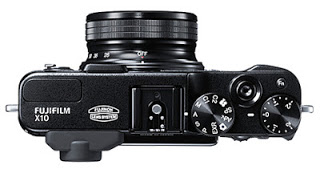
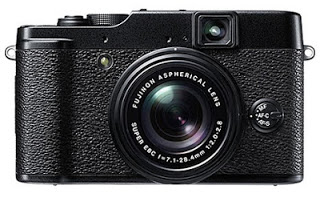
Front view of the Fuji X10 camera. Photo courtesy of Fujifilm.com

Camera photos from Fujifilm.com

I just purchased a Fujifilm X10 compact (X10) camera. I've owned numerous point-and-shoot (P&S) cameras over the years, most recently the Canon G10, before that a Canon G7. And I've never considered the smartphone as a walk-around camera or camera replacement.

But let's face it, carrying a DSLR around all the time takes some effort, so having a compact camera that takes quality images and has many of the same capabilities is something I've been searching for. In 2011 at PhotoPlus in New York I thought I had finally found it in the new micro four thirds cameras, mostly the Nikon 1 series. I still think these cameras are very good and again at this year's PhotoPlus I found myself looking at the 2 series and thought again this might be it.

So to back up a bit. In March of 2011 Fuji released the X100 and it caused a real buzz among photographers and much was written on blogs, both good and bad. The good mostly revolved around the styling and retro look. The bad, according to some, was focusing issues. I did love the styling and look of the camera and somewhere in the back of my mind pictured myself carrying this camera around and as Fuji continued the X series of cameras, those thoughts didn't diminish. Seeing the images produced by photographers, like Zach Arias only made me more curious about what I could produce with this camera. And not just what this camera was capable of technically, but having a camera that I really wanted to carry around was just as important. Can't make photos if you don't have a camera.

Top view of the Fuji X10 camera. Photo courtesy of Fujifilm.com

Problem was that both the Nikon micro four thirds series and Fuji X series were a little expensive. And the idea of spending around $1200 and up made holding onto the Canon G10 as my compact camera seem practical.

Still, every time I was in a retail or electronics store, I found myself looking over all the P&S cameras, mostly out of curiosity. So it was on a recent pre Black Friday shopping trip that I once again found myself looking at all the P&S cameras when the X10 caught my attention. From the moment I picked it up, it felt right in my hands. Also at under $600 the price tag seemed right. It was solidly built and had the same great classic look as the rest of the X series cameras, but what really caught my attention was that you turned in on and zoomed in and out by twisting the lens. That simple feature, combined with a viewfinder, made holding the camera feel right and set it apart from all the other P&S cameras there.

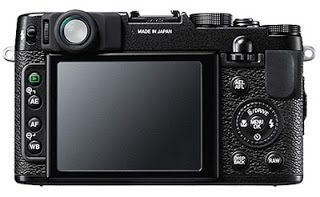
Rear view of the Fuji X10 camera. Photo courtesy of Fujifilm.com

I ended up spending about 20 minutes playing with the camera. Walked away and came back. The rest of the day I thought about the camera and as soon as I could, I logged onto the computer and read the reviews at Digital Photography Review and also at Dan Bailey's Blog along with others. As I said before, I was aware of and read about the Fuji X series cameras, so I'm not sure how I missed this addition to the line which was released in November of 2011. After looking at sample images, I made the decision that I wanted this camera. So the next day I purchased my used, in like new condition, X10 for $150 under the $599 retail price through Amazon from Roberts photo in Indianapolis and had it three days later.

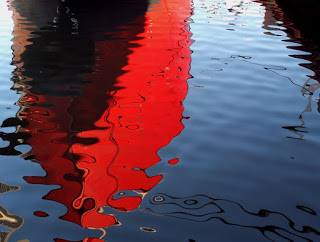
Reflection of the United States lightship Chesapeake (LV-116), part of the Maritime Museum in Baltimore, Maryland taken with the Fuji X10.

Reflection of the United States Lightship Chesapeake in Baltimore.

1/500, f2.2, ISO 400

I spent Friday photographing around Baltimore and my first impressions are good. The controls easy to use, intuitive and taking full control of this camera didn't require diving into complex menus. Most functions can be changed quickly using buttons which seem to be in just the right location. Even when shooting in manual mode, using the sub command dial makes setting f-stops and shutter speeds quick and natural.

I set the programmable function (fn) button to allow me to easily adjust ISO during various shooting conditions. I upgraded to Firmware version 2.0 which changed the functionality of the RAW button so it brings up a quick or "Q" menu giving me access to the most commonly used features on one detailed screen. Easy auto focus and auto exposure lock buttons allow you to recompose shots. This is the first P&S that I've used that I can operate all the buttons easily even when holding the camera to my eye.

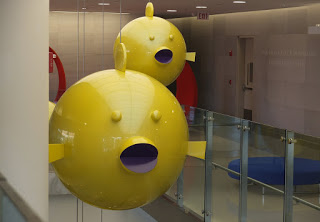
Robert Israel's

Robert Israel's "School of Puffer Fish" sculpture located at Johns Hopkins Hospital.

1/170, f2.2, ISO 200.

Calling the X10 a P&S is really a disservice. Just one day shooting with this compact camera felt like I was carrying much more. This isn't a DSLR replacement, but I am considering taking this as my second camera during an upcoming self-assignment project to Arizona.

I've only scratched the surface here and I look forward to writing more about this camera and sharing my thoughts and experiences while using it in future posts. I've already begun to add X10 photos to a Flickr set and cross posting to the Flickr Fuji X10 group.

Some specs that caught my attention :

Number of effective pixels: 12 million

Image Size: 2/3 inch EXR CMOS

Storage Media: 26MB internal, SD memory card

Lens: 28mm to 112mm equivalent   

Aperture: 2.0 (wide), 2.8 (telephoto)

Format: JPG, RAW, or RAW plus JPG

Get full specs at the FUJIFILM web site or watch the promotional video on YouTube.

Read Zach Arias' reviews and experiences with both the X100 and X-Pro 1.

Dan Bailey writes about the X10 on his Adventure Photography blog.

UPDATE: (4/24/2012) The X10 has been replaced by the Fujifilm X20 12 MP Digital Camera with 2.8-Inch LCD (Black)

.

(NO) WATERMARKS ON PHOTOGRAPHS

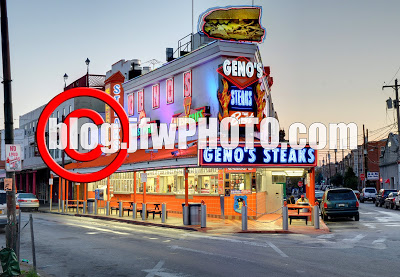
Bad watermark example
Over the top, YES, but I've seen worse.
I hope this post doesn't come off as a rant, however, I will state right up front that I am not a fan of placing watermarks on photographs.

A watermark is an image, logo, or text that is placed directly on the photograph, most often to brand the photo, discourage reuse or to somehow imply copyright. In the past we might have stamped PROOF over the photograph, thus preventing copies being made. This was effective and that's not really what I'm talking about in this case, because I do understand the argument for continuing this practice when you have wedding, event photos or portraits that you're sharing with a client with the intent to sell.

What I'm talking about is selected images that you post to the web as examples of your work, or post to sites like 500px or Flickr were you are hoping for feedback. In these cases it is my opinion that the watermark comes off as a distraction and that's only if it is a tasteful muted watermark of appropriate size. In many cases the watermark is just plain ugly, too big and demonstrates poor post production skills.

To be fair, I've struggled with watermarks over the years and even created a few and tried them out on my images. It just never looked right to me, which maybe says something about my post production skills.

However, for me it's gotten so bad that when I'm browsing through sites like 500px, Flickr or Google+, I won't favorite or like a photo that has a watermark. In fact, I get really disappointed when an image I like has a watermark on it. I don't even know when this started, but it did, and now I can't get past it.

Some  photographers, such as Trey Ratcliff over at Stuck in Customs, provide large images on the web, available for anyone to download for personal use. The key is personal use.

My feeling is that whether an image contains a watermark or not, it can still be downloaded and used by someone as a background on their iPad for example. And that's assuming that whoever right clicks and downloads doesn't just eliminate the watermark by cropping or even using the content aware tool in Photoshop. Sounds pretty easy doesn't it.

So do I worry about my images being stolen? First, all the photos I shoot as part of my job are publicly released, so it isn't an issue. Second, when it comes to my personal images shared on sites like Flickr and 500px, I make them available as creative commons, non-commercial, attribute required. In the end, I'm not worried if a blogger uses the image as long as they provide photo credit in the form of a link because that potentially drives more traffic to my site. If they don't, then I'm not going to lose sleep.

So how do you truly protect your images. One word, copyright. That is the only real protection you have if one of your images ends up being used without permission, watermark or not. Copyrighting your photographs also provides you with additional protections. I'm planning a future post on the process and work flow I use to copyright my work, and why this is important. In the meantime, check out eCO FAQs, or visit Ed Greenberg and Jack Reznicki's thecopyrightzone.com blog.

WORLD WIDE PHOTO WALK REDUX


So the 2012 World Wide Photo Walk results are in and you can see the grand prize winner and 10 finalists over at Scott Kelby's blog along with many of his personal favorites that didn't make the cut.

The really cool thing is that at the World Wide Photo Walk web site in the people's choice section you can see all the local walk winners from around the world and get the opportunity to vote. They are presented in order alphabetically by location.

Entering contests means you put yourself out there for others to judge. In this case you were judged by your local walk leader, then by Scott. I don't envy having to go through all these images and pick just one winner. I've been a photo contest judge in the past and know that everyone will second guess you. Even in this case as I looked through all the local winners, I found images that I liked better than those ultimately selected. That doesn't mean anything really, because who am I to disagree, the ultimate winner is a very nice photograph.

I participated in the Washington DC (Capitol Hill and The Mall) photo walk and thought I would share a few thoughts about the day and the process I used for selecting my contest entry. First, it forced me to get up before dawn on a cold morning and photograph around the U.S. Capitol Building and for that I am grateful. And I was happy with the results after two hours of shooting.


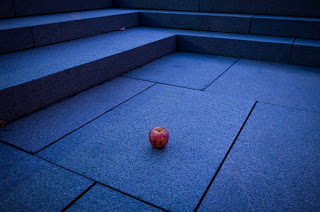
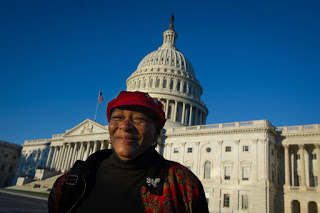
When the time came to select which photo I would enter, I struggled a bit. Did I submit the night shot of the Capitol, a portrait, or the still life of the apple taken in front of the Department of Health and Human Services? The shot of the Capitol was technically very good, but I figured everyone would have a similar shot and there was nothing really special about it. The lighting in the portrait was very nice and I figured most other walkers would not have photographed people, concentrating instead on the buildings. And the apple, which I thought was something very different, a found object in an unusual location, might stand out among other submissions.


So I went with the apple and was happy with the decision. I don't mind being judged and even though that photo didn't receive as much praise as the others when shared on Facebook and Flickr, it was my decision and that is a freeing experience. I've spent much of my photographic career playing it safe and this was my small chance to just go with my feelings.

My photo was not selected by the local leader and in fact when all the local photos were posted, I picked the same photo that was ultimately selected.

Would I have won if I went a safer route and submitted my night Capitol shot? It was better than the other night shots submitted after all. But the fact that others had submitted those same shots just confirms that I was conforming again which only makes me happier that I submitted the photo I did.

I mentioned in a previous post on the topic what I hoped to get out of a group photo walk and things went pretty much as expected. Following other walkers and leaders, as well as posting photos on Google + was a great way to connect and expand on the experience. It also made me take a second look at using Google + more often. One thing that I hoped for was a little more interaction between walkers and some follow up afterwards. From what I saw on Google +, it appeared many of the other groups met and shared photos immediately following the event.

I have an idea for a great walk location next year and will apply to be a group leader. More to come on that.

See my selection of photos from the Washington DC (Capitol Hill and The Mall) World Wide Photo Walk on Flickr.

5 TIPS TO UP YOUR PHOTOGRAPHY TRADE SHOW EXPERIENCE

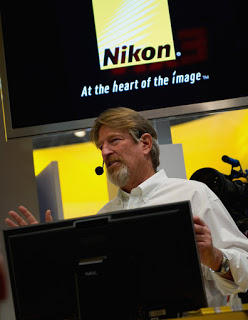
Sports Illustrated photographer

Robert Beck

gives a presentation at the Nikon booth.

Last week I attended

Photoplus Expo

at the Javits Convention Center in New York City and thought I would share a few tips on getting the most out of your trade show experience.

First, many conferences, such as

Photoshop World

or Photoplus offer free access to the expo or trade show portion, so even if you are not attending the conference sessions themselves, you can still get access to camera manufacturers and vendors.

And it's not just hardware and software. Many booths have speakers throughout the day offering presentations on how they use the latest gear or software.

So how do I approach these opportunities? Below are five tips on attending a trade show.

1. Take the time to make a plan and do your best to stick to it. I normally find out which photographers will be presenting at booths and make a schedule of who I want to listen to, either for inspiration, or because they will be demoing software or hardware I'm interested in. With that speaker schedule set, I can move on to the next step.

2. I look over the list of exhibitors and put a check next to those manufacturers or vendors I want to engage with. Looking at the floor plan, I then decide where I will start, normally on the outside edge and then move up and down the aisles stopping at the vendors I've marked while making a note of additional booths that I might return to. Unless you are at a show the size of NAB in Las Vegas, you can normally make several passes around the entire show floor.

3. Do a little homework before you go. While you may see something that is completely new, most of the time, you'll have an idea about what will be on display and have read the press release and followed user reviews. The purpose of visiting a booth then is to get your hands on a piece of equipment as well as the direct access to those that should be able to answer your questions. However, sometimes the first person you meet at a vendors booth is not a subject matter expert and may not know more than you can read online. Be nice, but if you really want an answer, ask if there is someone else present that you might be able to speak with. And if that person is swamped, see if you can make an appointment to return.

A chance to check out video capabilities and get my hands on a D4 and a D800.

4. Don't avoid exhibitors of products that are competitors of what you are currently using. Normally on the second trip around the show floor, I will make a point of visiting other camera manufacturers just to see what they offer. Knowledge adds credibility when talking with clients or answering a question from another photographer. Even though I had a Nikon over my shoulder and a Think Tank bag around my waist, I still checked out Canon, Panasonic, Lowe Pro and Kata, for example. And I do own some of those products as well. Also, if you are completely satisfied with a piece of equipment, let those at the booth know. This is your chance to offer positive feedback or make suggestions.

5. Finally, make sure to take care of yourself. Your comfort will go a long way in making this a positive experience. Wear comfortable clothes and shoes. Eat and drink throughout the day. Get off your feet (booth presentations are a great time to do this but get there early). Bring a camera so that you can capture products or ideas that you want to investigate further.

If you leave the show frustrated and tired, then you haven't done it right. You may be tired, but you should also be energized and ready to get out and take photos. I came away inspired after listening to Robert Beck and

Corey Rich

at the

Nikon

booth. I received a $500 off coupon from 

DriveSavers

 and a small

GorillaPod

from

SquareSpace

, both services I'm planning on using now.