PHOTOGRAPHING INTO THE SUN

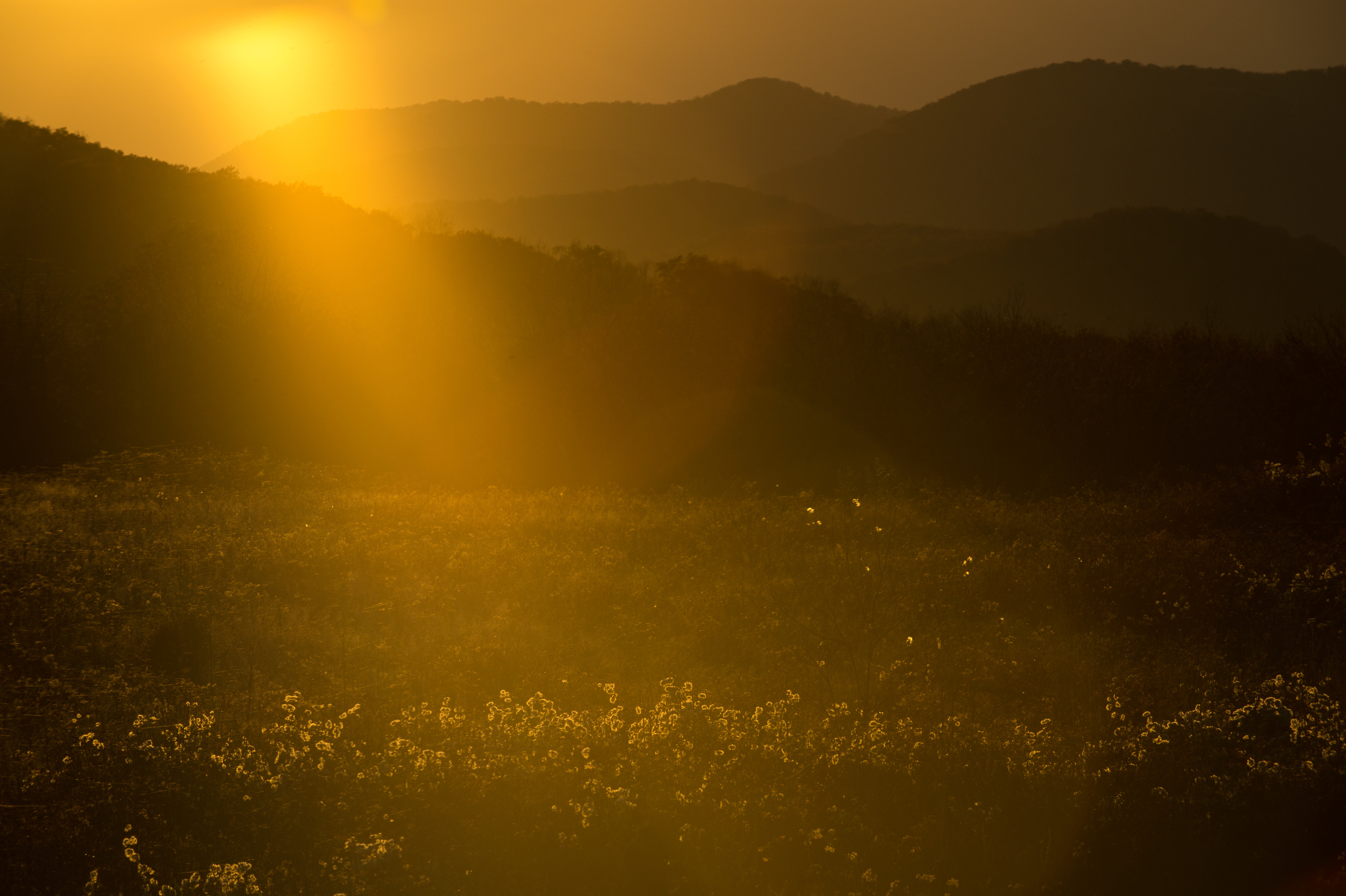
This photograph which was taken one hour before sunset exhibits typical lens flare that causes artifacts usually in the shape of the iris. Lens flare is more common when using a zoom lens. ISO 200, f11 @ 1/500, with a Nikon 70-200 2.8 at 200mm.

This photograph which was taken one hour before sunset exhibits typical lens flare that causes artifacts usually in the shape of the iris. Lens flare is more common when using a zoom lens. ISO 200, f11 @ 1/500, with a Nikon 70-200 2.8 at 200mm.

Light is the key to photography and as we continue to chase that light, more often than not we find ourselves out during the golden hour; that wonderful time around sunrise and sunset. However, after it has risen or while waiting for it to set, we rarely point our cameras in the direction of the sun and that's a shame.  

During two recent visits to Shenandoah National Park, I found myself embracing the idea of pointing my camera into the sun and came away with some beautiful results. 

This photograph was taken one hour after sunrise from high above the valley backlit by the sun. The light shining through the early morning fog gives this image a soft, ethereal feel. ISO 200, f22 @ 1/400 with an Nikon 80-400 4.5/5.6 at 400mm.

This photograph was taken one hour after sunrise from high above the valley backlit by the sun. The light shining through the early morning fog gives this image a soft, ethereal feel. ISO 200, f22 @ 1/400 with an Nikon 80-400 4.5/5.6 at 400mm.

One reason, of course, you might avoid shooting in the direction of the sun is lens-flare, but perhaps that is the exact reason you should keep shooting. Traditional we have been told that lens-flare is a mistake, something to avoid, but more and more I'm seeing it used as an artistic effect. I believe it can add an authenticity to a photograph, almost like you did make a mistake, as if you suddenly turned around, grabbed your camera and fired off a frame.

Another reason that you might avoid shooting in the direction of the sun is that it tends to produce flat, monochromatic images. However, it is just that lack of contrast that can give a photograph an otherworldly or ethereal feeling. A sense of being overexposed, but in a good way. 

The sun, just out of the frame at right one half hour before sunset produced this unexpected pinkish hue. Shooting into the light can often result in flat, monochromatic images. ISO 200, f4.5 @ 1/80, with a Nikon 300 2.8.

The sun, just out of the frame at right one half hour before sunset produced this unexpected pinkish hue. Shooting into the light can often result in flat, monochromatic images. ISO 200, f4.5 @ 1/80, with a Nikon 300 2.8.

Don't get me wrong, sometimes lens-flare and flat imagery is not desired, otherwise we could all throw away our lens shades and only purchase inexpensive zoom lenses and place cheap filters on them. 

Keep in mind a few things when shooting into the sun. Use live view instead of looking through your DSLR camera, especially with a long lens. Set your camera to manual mode, both exposure and focus, so you control the effect, otherwise the camera will try to compensate for your "mistake."  

So the next time you are waiting for the sun to set or turning your attention elsewhere after the sun has risen, keep shooting. And if you quickly dismiss a photo because of lens-flare while editing, go back and take another look, you might be surprised.

PHOTOGRAPHER'S PEACE OF MIND

The PacSafe Backpack and Bag Protector is the perfect way to secure a camera bag. 

The PacSafe Backpack and Bag Protector is the perfect way to secure a camera bag. 

I've been a victim of camera theft. I had a camera bag taken from an unlocked car in my driveway; it was a horrible feeling. I lost just about everything and it didn't matter that it was my fault, the fact remained that if you have your cameras stolen, it will pretty much ruin your day, your trip, or just maybe your livelihood.

Maybe it was that long ago feeling that still makes me incredibly nervous, sometimes to the point of anxiety, when I have to leave camera equipment in my car, that had me searching for the best solution to keep it safe.

And minimizing the ability of someone to relieve you of your gear, whether it's in your car, on a train or back at the hotel, will give you the peace of mind to concentrate on taking great photographs or enjoying a meal during down time.

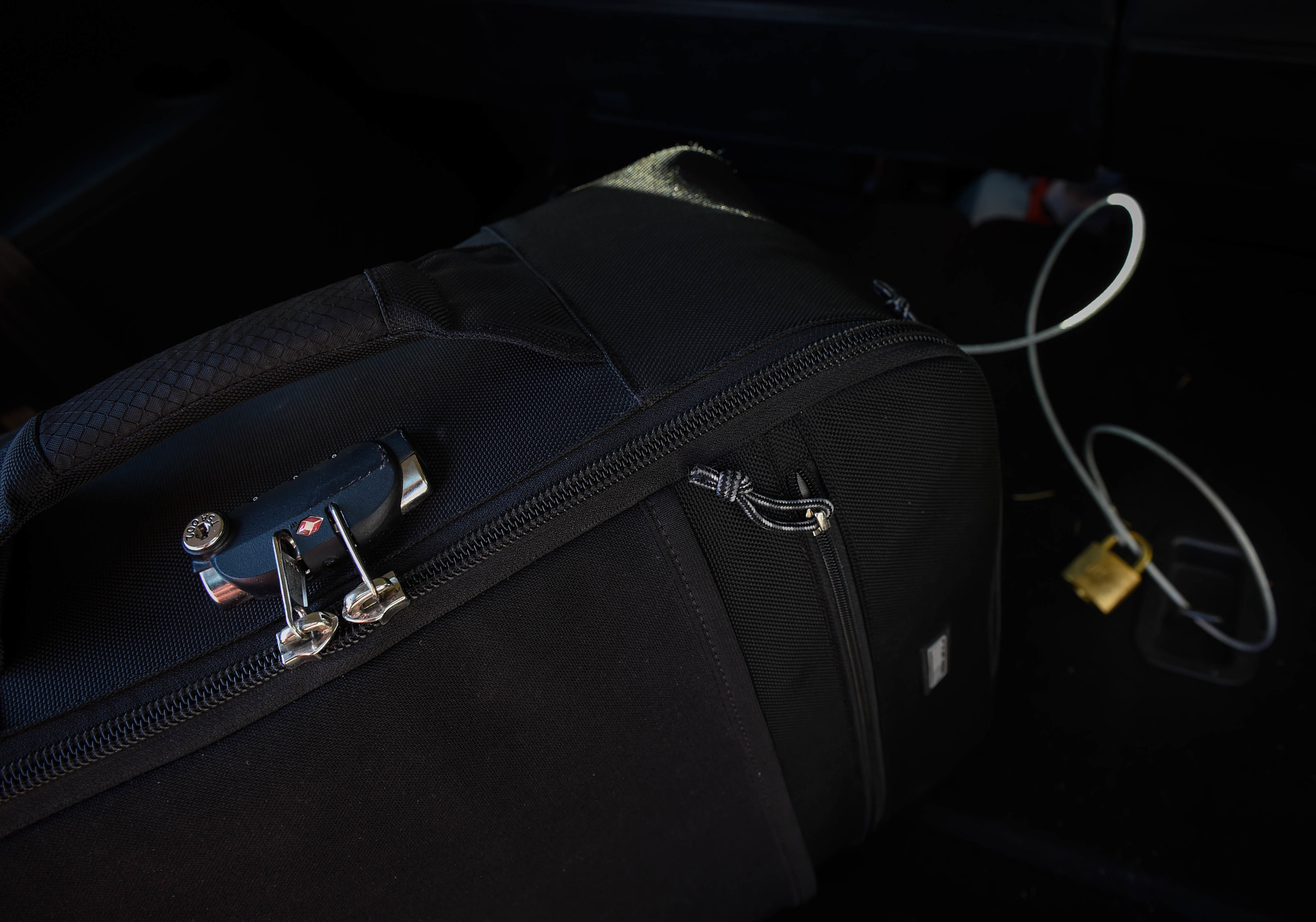
The Thinktank Airport security bag has both a lock and a built it cable that allows you to secure the bag to a tie down point in your car. You can also run the cable through handles of other luggage and secure them as well.

The Thinktank Airport security bag has both a lock and a built it cable that allows you to secure the bag to a tie down point in your car. You can also run the cable through handles of other luggage and secure them as well.

Even if you plan on carrying all your cameras and lenses on your person, you certainly aren't going to carry your laptop, hard drives, and other peripherals.

So what can you do to decrease the likelihood of theft? Decrease, because nothing will stop a determined thief, especially if they have time.

1. Many camera bags or equipment cases can be locked, so take advantage of that. I use a Thinktank roller bag which has a cable that allows me to secure the bag to an immovable object, like a tie down point in my car.

While a trunk seems more secure than an SUV or hatchback, it's still no guarantee that your equipment is any safer. Out of site is good, but it doesn't mean out of mind.

While a trunk seems more secure than an SUV or hatchback, it's still no guarantee that your equipment is any safer. Out of site is good, but it doesn't mean out of mind.

2. For camera bags that do not have built-in locks, I've found the PacSafe Backpack and Bag Protector to be the perfect solution. Realize that a thief can still reach zippers through the mesh, so I use an additional lock on the compartment where I keep items that could be removed, such as keys, a hard drive, flashlight, etc. The PacSafe also has a cable that can be secured to a fixed object.

3. When I leave my computer back at the hotel or am working in a press room, I use the Kensington Security Cable with a key lock. For a few dollars more you can get the combination lock version.

Final advice is to be aware of your surroundings. If you are at a location known for photography, it pretty much is a given that you have gear in your car. And while you could bring less gear and travel lighter, you've invested in it and after all the effort to get to the best location, you don't want to be without it.

Video demonstration of the PacSafe.

TIME TO REVISIT OVERLOOKED PHOTOGRAPHS

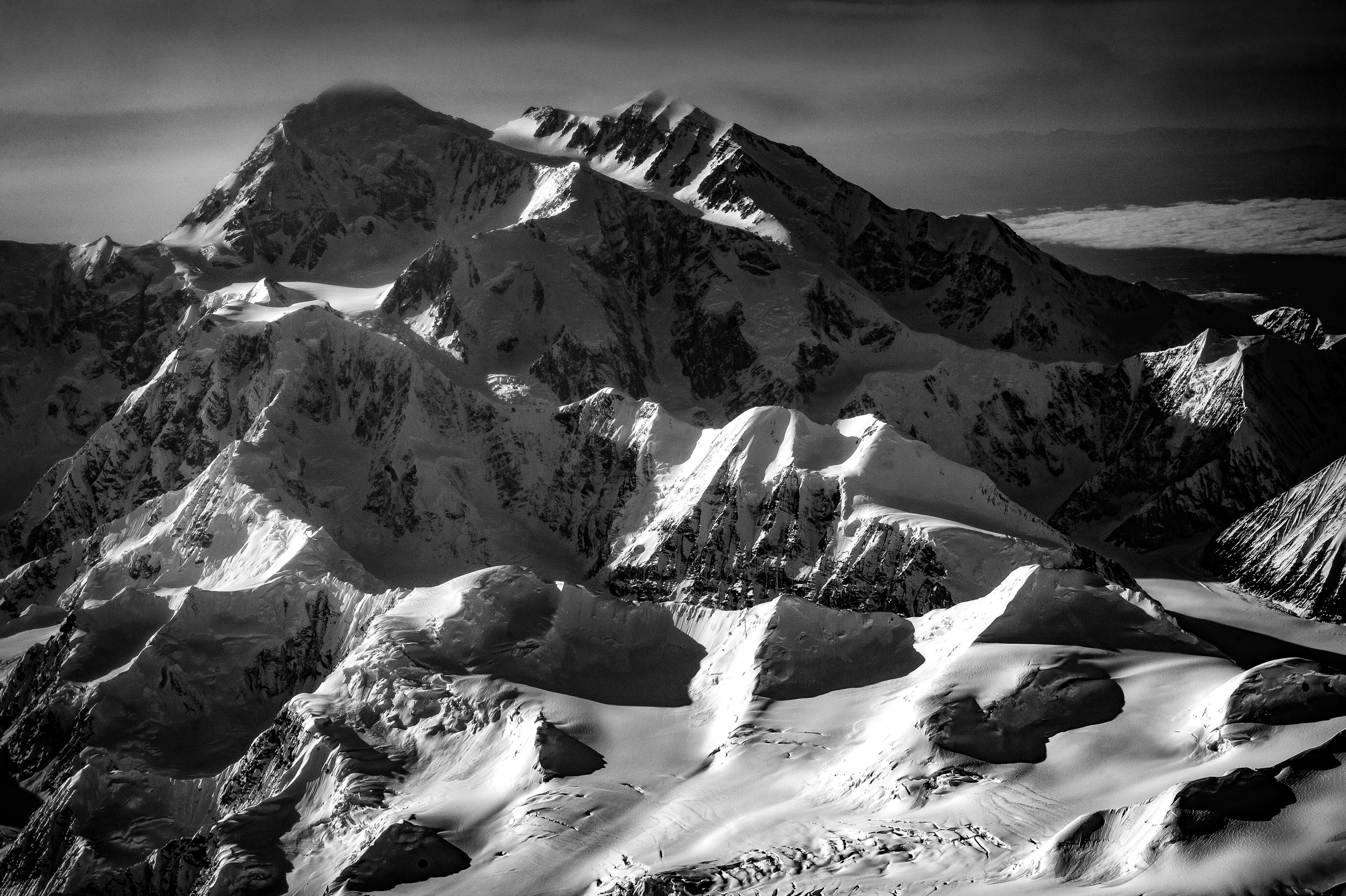
The final image of Mt. Denali edited in Adobe Lightroom CC and converted to black and white.

The final image of Mt. Denali edited in Adobe Lightroom CC and converted to black and white.

When I read the recent news about the name change of Mt. McKinley in Alaska to Mt. Denali, I remembered taking a photo through the window of a U.S. Coast Guard P-3 Orion late last year following an assignment in the Arctic.

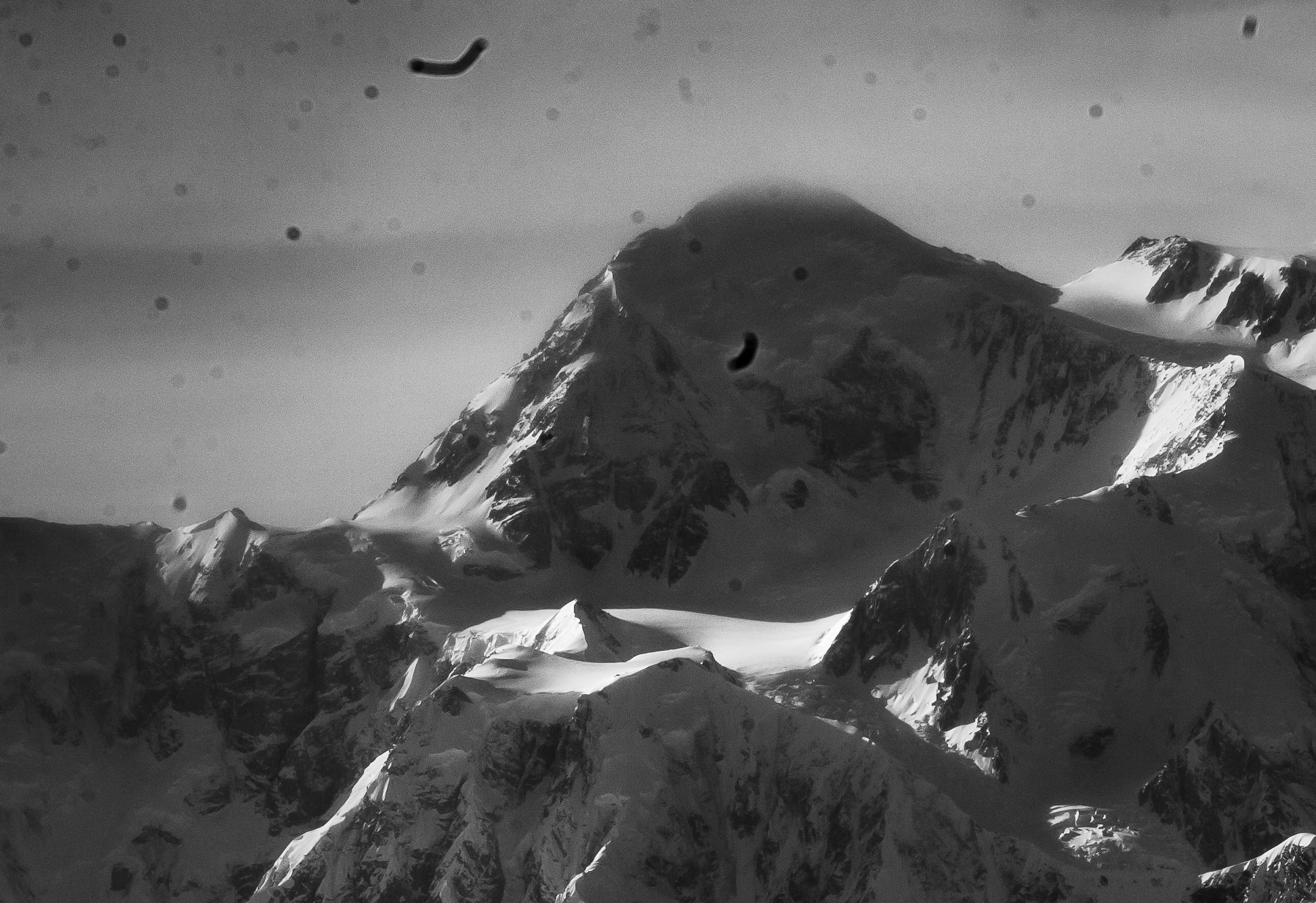
After locating the photos on my hard drive, I quickly realized why I never bothered to process them at the time. They were bad. There was little color, no contrast, and very flat light. That was before I even bothered to notice all the dust spots. Nothing to get excited about here, right?

The original raw image seen at left was shot with a Nikon D3S and 24-70mm f2.8 lens zoomed to 70mm, at 1/400, f13 with an of ISO 250. Final image is at right.

The original raw image seen at left was shot with a Nikon D3S and 24-70mm f2.8 lens zoomed to 70mm, at 1/400, f13 with an of ISO 250. Final image is at right.

Still, I did shoot in Raw, so I really had nothing to lose by bringing the photos into Adobe Lightroom CC and seeing if anything could be done to rescue them. After a few minutes of editing, something wonderful began to appear.

I am continuously amazed by the power of image editing software, especially Lightroom CC. Not only is it powerful software, but it is really easy to use and incredibly intuitive. While I use Adobe Photoshop CC as well, I find myself using Lightroom more and more as my primary image editing choice.

Lightroom has a very good spot removal tool, but because of the amount of clean up needed in this photo, I switched to Photoshop and used a combination of the spot healing and clone stamp tools.

Lightroom has a very good spot removal tool, but because of the amount of clean up needed in this photo, I switched to Photoshop and used a combination of the spot healing and clone stamp tools.

However, when you combine the two programs then you have the ability to do some amazing things. Adobe realized this and now offers a photography plan where you get both programs for $9.99 a month.

Getting it right, or at least closer than I did with this photo, in camera is still the best thing you can do. But it also doesn't hurt to go back and see if you can turn those overlooked photos into something wonderful.

Online resources:

Lightroom Killer Tips

Adobe Photoshop Lightroom tutorials from novice to expert

5 REASONS I CHOOSE SQUARESPACE

The Homepage offers a slideshow gallery that advances automatically and displays photographs that do not appear anywhere else on the site. UPDATE: October 22, 2015. Added an additional category and Homepage now features a photo from each.

The Homepage offers a slideshow gallery that advances automatically and displays photographs that do not appear anywhere else on the site. UPDATE: October 22, 2015. Added an additional category and Homepage now features a photo from each.

Until the move to Squarespace, I was a hand-coder. Yes, I can admit it, I hand-coded my website. Even over many years and many iterations of jfwphoto.com I continued to hand-code. Most recently it was a fairly simple site, one page deep and featured a java slideshow, my twitter feed and links to everywhere else you could find my work. It wasn't horrible, but it also wasn't anything I was particularly proud of or special and more to the point, I wasn't really driving anyone to the site.

I realized a while ago that it was time to get serious and finally have a website that I actually wanted to share with others and for that reason I made the move and relaunched my presence on the web.

Here are five reasons I made the switch from hand-coding to Squarespace.

1. One location for everything. It gives me a true presence, one URL, that I can now share which will highlight my photography, provide some information about myself, AND still provide a launching point to social media. There is still one BIG thing I have not yet moved, though. This blog. I do plan on eventually incorporating it and Squarespace offers step-by-step instructions on how to transfer most popular publishing platforms, including Blogger, into their framework without breaking links, etc. I just need a little more time.

I'm using the About page to also provide links to tear sheets and my affiliate links. 

I'm using the About page to also provide links to tear sheets and my affiliate links. 

2. The content management system. I'm already an admitted hand-coder, therefore I know HTML and can build a website from scratch, but the reality is my skills will only allow me to build sites circa 2005. The web is so much more dynamic these days and having the ability to update a site quickly and easily was important to me. Squarespace makes it easy through their CMS and once you understand how it works, you can update or make changes in only a few minutes. I admit that I dove right in during the two-week trial and became a bit frustrated. However, once I took a step back, watched some tutorials, and looked at other Squarespace sites that used the same template I choose, the process of building my site became very easier. 

3. A wide selection of templates. The first thing that drew me to Squarespace was seeing other photographers using the platform. I liked the variety of templates, how most designs were clean and simple. One downside to temples, of course, is that all sites can begin to look the same. To make your site stand out, Squarespace gives you the ability to use custom code which I've started to incorporate and eventually is what I hope will make my site stand out. Also, switching between templates, even after your site is built is really easy to do and makes it possible to experiment with different looks.

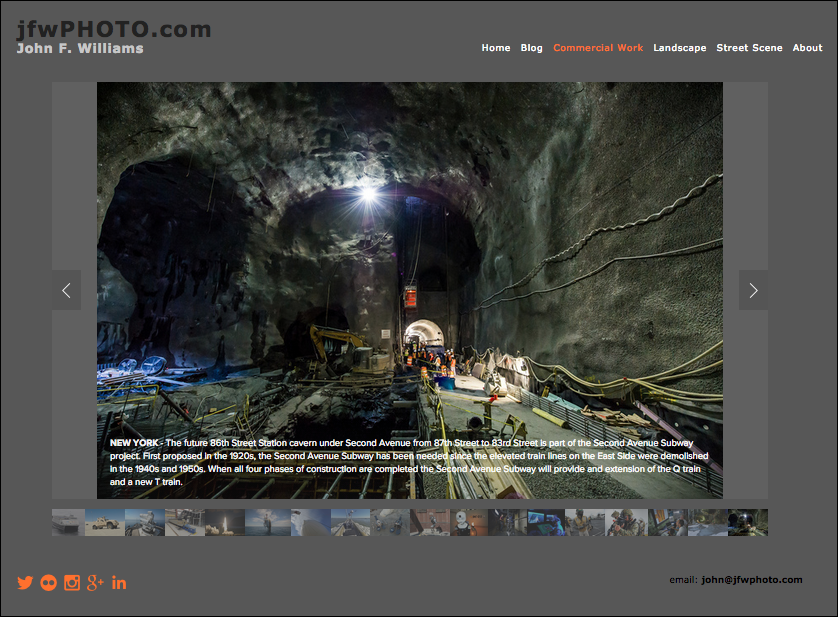
This is typical of my gallery pages where I offer both navigation arrows and thumbnails. However, the commercial gallery seen here is the only place I offer full caption information on every photo.

This is typical of my gallery pages where I offer both navigation arrows and thumbnails. However, the commercial gallery seen here is the only place I offer full caption information on every photo.

4. Mobile devices. While I don't have current metrics on jfwphoto.com as proof, it is my belief that most people will be accessing my site on their phones or tablets. While not always ideal, having a website that scales and displays properly on a small screen is critical. Squarespace does a really nice job with this and I love how it looks on my Samsung phone and Apple iPad 2. I already have shared my site with others in this manner. 

5. Support. Let's face it, it's nice to be able to call someone when you have a problem. It's also nice to be part of a user base that offers inspiration, advice, problem-solving and provides customization tips when needed. Squarespace is well established, hasn't stagnated and continues to be one of the leaders in providing website services to photographers and other creative people.

With all the previous versions of my site, I would build it then and mostly forget it. However, with Squarespace I find myself revisiting every couple days, making small changes, or adding more photographs, or experimenting with styles. Why? It's easy.

And that's what it really comes down to after all, ease. A website that doesn't change or one that you don't use because it is too hard to update is a waste of a URL and does nothing to promote you or your photography. So stop putting it off and give Squarespace a shot.

THE RELAUNCH OF JFWPHOTO.COM

The homepage of jfwphoto.com using the Squarespace Ishimoto template.

The homepage of jfwphoto.com using the Squarespace Ishimoto template.

It's taken much longer than it should have, but I relaunched jfwphoto.com using Squarespace and finally have everything in one place*.

I've been thinking about this for years and now that the new jfwphoto.com has been public for several weeks and I've had the chance to work and refine it, I'm glad that I did this and question myself as to why I waited so long.

In a subsequent blog post, I'll go into the details on why I choose Squarespace and offer some insight into the process along with my experiences in building the website, but for now, I hope you take some time to view my site, offer some feedback, and most importantly, ask questions.

Landscape gallery page using slideshow with Show Thumbnails and Show Next and Previous Controls selected. I'm still trying out various gallery styles.

Landscape gallery page using slideshow with Show Thumbnails and Show Next and Previous Controls selected. I'm still trying out various gallery styles.

If you are thinking about using Squarespace, they offer a full week 14-day free trial with no credit card required. I would also recommend you watch a few of the tutorials.

*Everything except this blog. Also, I currently have a redirect on the domain jfwphoto.com through GoDaddy. Both of these will change.

UPDATE: On October 20, 2015, Blog was incorporated into this site and Domain was switched.